No code written by me, real expense reports in our ERP.
A few weeks ago I didn’t know what a purchase request was. Last week I built an app that creates them.
The surprising part: the ERP was the easy part. The hard part was everything outside it.
I joined Lensing a few weeks ago. Before that I had never worked with an ERP, and the first time I opened Lensing was for this project. I wanted to find out what “[every application in Lensing can be run through its APIs” means in practice, for someone like me.
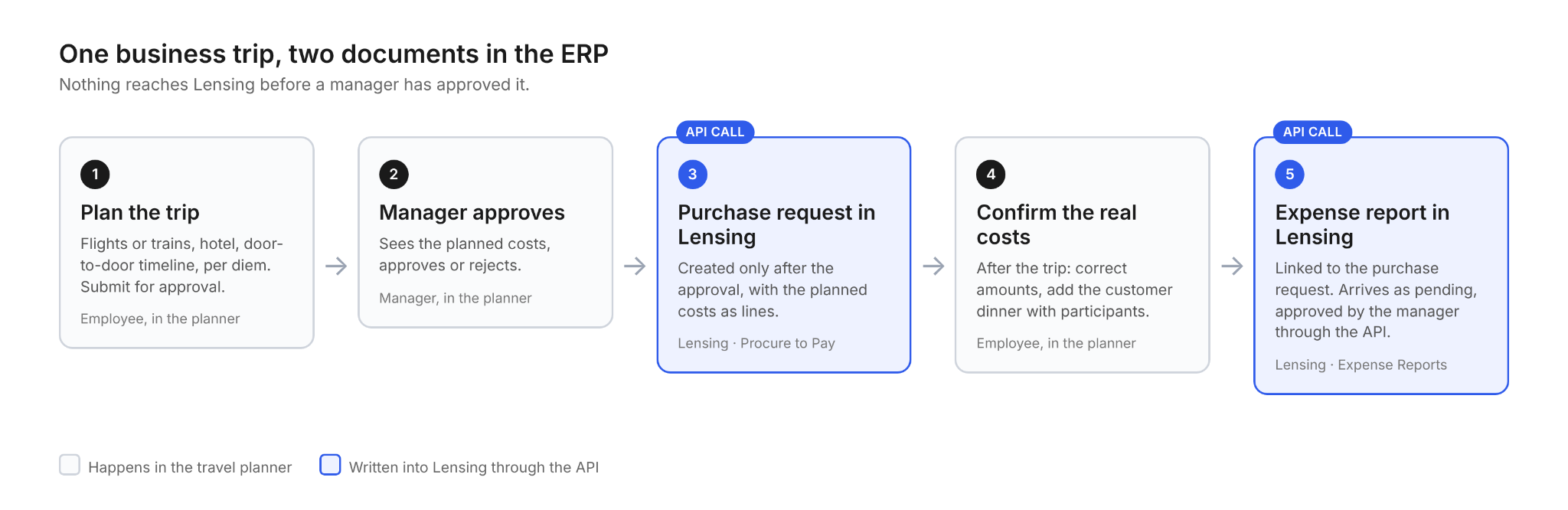
The result is a small travel planner. You type in where you’re going and when. It finds flights and a hotel at real prices, plans the trip door to door, works out the daily allowance, and files a travel request in Lensing for your manager to approve. After the trip, you correct the numbers, add the dinner with the customer, and it files the expense report.
Two prompts for the first version. A few sessions for the real one.
It started with two prompts
The first version was not a plan. It was a test. I opened a sandbox of our ERP, connected Claude to it through Lensing’s MCP server, the connection that lets an AI assistant read and act inside the ERP, and typed: “Build me a travel planner UI.”
The second prompt was the actual request: “Heidelberg to Berlin, Monday to Friday. Find real Deutsche Bahn connections and hotel prices.”
What came back was a page with real train connections, including times and classes, fares and hotels to choose from, and the German meal allowance worked out for the days away. One click, and a complete expense report with the matching lines appeared in Lensing: in the sandbox, numbered, with the status “pending approval,” without touching a single live record.
I didn’t write any of the code. I described what I wanted, Claude built the page and wired it to Lensing, and I tested it. The data was real: real fares, real hotels for those dates, not sample numbers.
That was the moment the question changed. If two prompts give you a page that files an expense report, what would it take to build a real application? Any city, not just the route I had typed in. A manager who approves. The costs you only know once you’re back.
Version 2: any city, real prices, real per diems
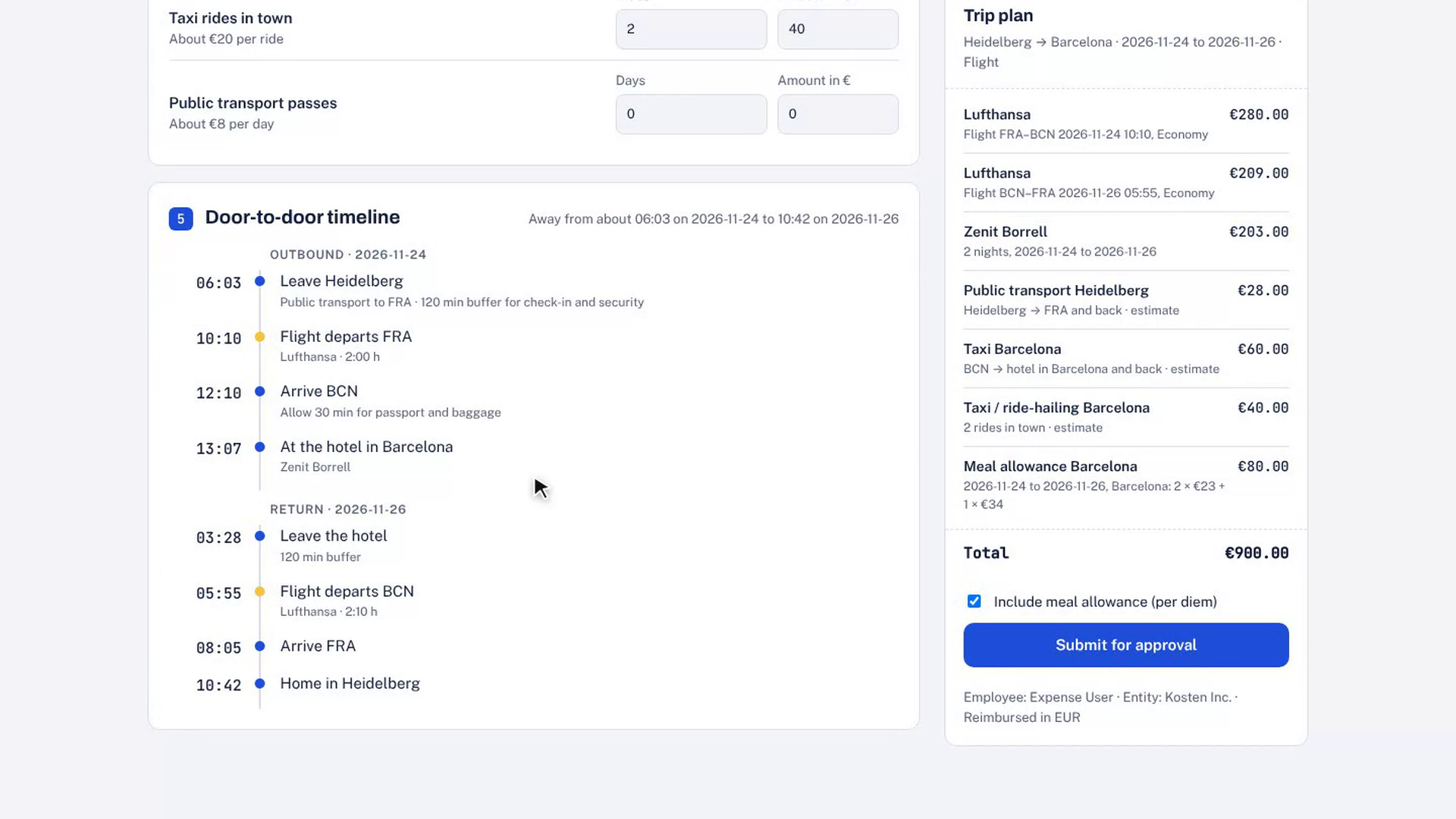
For version 2, we planned properly before building anything. The planner now works for any city, decides on its own whether you should take the train or fly, and plans the journey door to door, with a timeline and buffers for check-in and connections.
The piece I hadn’t expected to care about was the per diem. Germany publishes allowance rates for every country and for about thirty large cities. The planner knows the 2026 rates, falls back to the country rate when a city is missing, and reduces the allowance automatically: 20 percent for a breakfast included in the hotel rate, 40 percent for a lunch or dinner someone else paid for.
The searches themselves run through Claude’s browser in the desktop app. The planner has no internet access of its own. It asks the browser to open Google Flights or Booking.com, reads the results and shows them. The prices are real. The bookings are not; the planner books nothing. It plans, and it files.
Adding approvals: before and after the trip
This is the part that turned a demo into a process, and it came from a simple observation: nobody files an expense report before a trip. They ask for permission first.
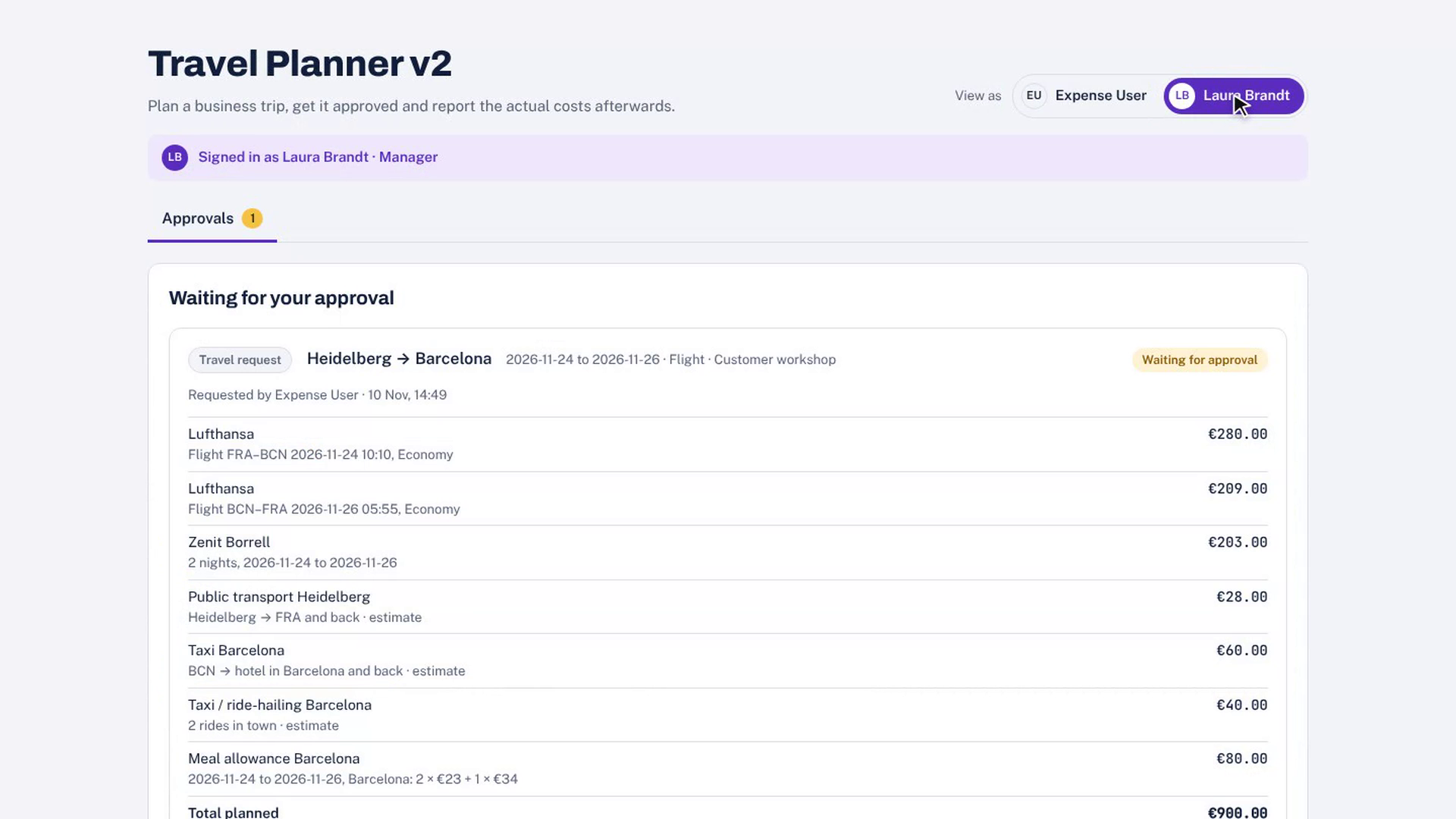
So the planner has two phases. Before the trip, the employee plans and submits. The request goes to a manager, in the demo a role called “Laura,” who sees only the approvals tab and can approve or reject. Only when she approves does the planner create the purchase request in Lensing. Nothing lands in the ERP that nobody has signed off.
After the trip, the employee opens the same trip under “After the trip.” The planned costs are there, waiting to be overwritten with the real amounts. The taxi was 36 euros instead of 30. There was a dinner with two people from the customer; the planner asks for their names, because our expense category for entertainment requires participants, and cuts the per diem for that day accordingly. Submit, and the planner creates the expense report in Lensing with a reference to the purchase request. It arrives as “pending.” The manager approves it through the API, and from that point on it’s an ordinary expense report in the books.
The role switch is a demo device. In a real deployment, the employee and the manager would be two accounts, and the approval policy in Lensing would decide who approves what.
What didn’t work
An honest list, because it says more about the project than the feature list does.
Reading web pages was fragile. Small things, like Google Flights changing its layout at different window widths, broke the search until we found them.
The train search was harder. Reading bahn.de works in principle, until it doesn’t: one morning the site blocked the automated browser as a bot. We decided not to work around that, not with another browser, not with any tricks. If a site says no to automation, the answer is no.
So I looked for an official route. Deutsche Bahn runs a developer marketplace with 24 APIs covering timetables, real-time departures, disruptions and station data. What you don’t get is a connection from A to B with a price. Train connections are now pasted in by hand, using a small form.
The lesson underneath: where an API is missing, everything becomes fragile, because a web page is not a contract. It changes when it wants to. Where an API exists and describes itself, it’s the easy part. Which brings me to the ERP.
Why the ERP was the easy part: a self-describing API
The ERP part was the easy part. That surprised me most.
Two actions do almost all of the work. One creates the purchase request, with the planned costs as lines. One creates the expense report, with categories, participants for the dinner, and the per diem as its own line type. A third updates a report that has already been submitted, so the employee can fix a number before the manager looks at it. Approve and reject exist for both documents, and a rejection needs a reason the employee gets to see.
What made the difference was not the number of endpoints. It was that every one of them describes itself: what it needs, what it returns, and which error it raises when something is missing. A dinner without participants is refused, and the error says why. Claude reads that and corrects the call.
“I never opened the documentation. The system explained itself to the model.”
Everything ran in a sandbox, a private branch of the live system. Real rules, real documents, nothing merged back.
What this means for finance teams
I’m not a developer, and this isn’t a finished product. The train search is manual, foreign-currency handling is only half tested, and a real company would want receipts attached, which the API accepts only for files that are already uploaded.
But the point was never the planner. The point is who built it. If an ERP exposes its processes through a clean, self-describing API, the people who know the process can build the tool, with an AI assistant doing the typing. Finance and operations teams stop waiting for the integration backlog. They describe what they need, and they test it on their own numbers, in a sandbox, before anyone else sees it.
Want to try it yourself? Get a free Lensing sandbox and connect ChatGPT or Claude in a few minutes.